
Intro
This is a short guide on how to play RPG Maker 2000/2003 games on the Miyoo Mini and Miyoo Mini Plus using Onion OS.
Onion OS includes the Easy RPG libretro core but it is an experimental core so not all games will run smoothly. For example, Theia – The Crimson Eclipse had massive slow downs during battles. You’ll have to see how well each game runs on a game by game basis.
This guide will assume you already have Onion OS. If you need help, please feel free to leave a comment or refer to my written/video guide here: https://duckyobrien.com/2024/02/15/playing-nintendo-ds-games-on-the-miyoo-mini-plus/.
Installing Easy RPG
Easy RPG is already included in Onion OS so you can load the Easy RPG core just like any other core from the RetroArch menu.
If you don’t want to use RetroArch, we can install the Easy RPG shortcut using the Package Manager and it’ll be available from the Expert Shortcut App.
Once in Onion OS, navigate to the Apps folder and start the Package Manager. Press R once to navigate to the Apps tab. From here, make sure Expert (Shortcut) is enabled, as this is how we’ll be accessing Easy RPG.

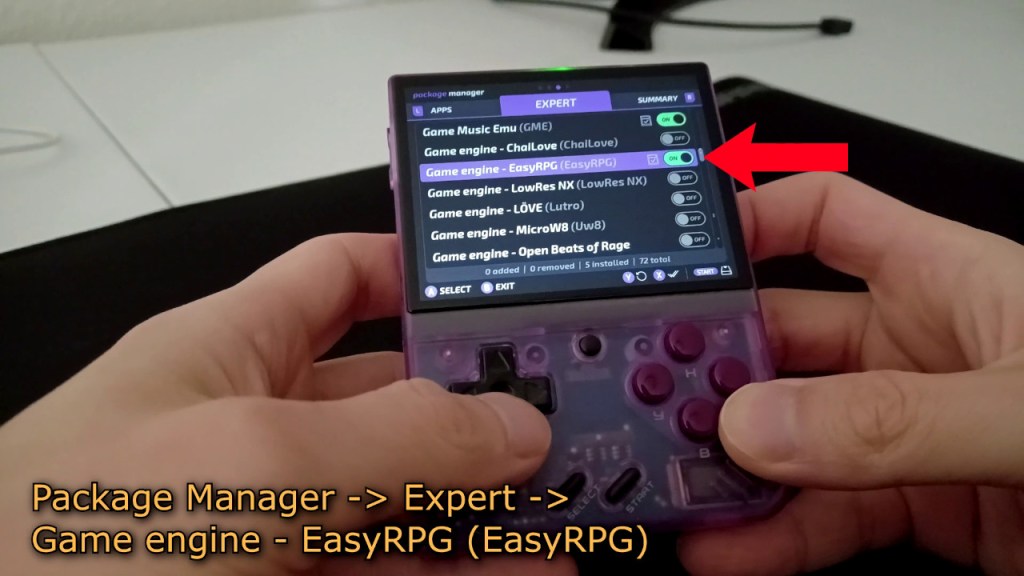
Press R once more to navigate to the expert tab in Package Manager. Scroll down to Game engine - EasyRPG (EasyRPG) and make sure it is enabled. Press Start twice to save the changes and exit Package Manager.
Copying Easy RPG into the Emu Section
If you don’t want to go through the tedium of having to go through Apps -> Expert Shorcut -> Easy RPG, you can simply copy the easyrpg folder in SD:\RApp\ to SD:\Emu. This will let you start Easy RPG from the Games folder like the rest of your emulators. It’s just a file to launch the libretro core and as far as I can tell doing this causes no issues.
Installing RPG Maker Games
Just keep in mind the core is marked as experimental by the Onion devs so even supported games may not run properly.
The devs recommend having your game files be zipped to work the best. You can extract the contents and then load the .exe file manually from Easy RPG but I found this to be cumbersome since you have to navigate to the file. Zip files make it easy copying games over to your microSD card as well as starting them in Onion OS.
I prefer to use 7-Zip. You can download 7-Zip here: https://www.7-zip.org/.
If your game files are not in the .zip format and are in a different format like .rar or .7z, we’ll have to extract the contents and zip them.
Right click on the file, go to 7-Zip-> Extract files…. and click OK to extract the files.
After extracting, navigate to the folder containing the game files.
Right click on the folder you want to package, go to 7-Zip -> Add to archive….
Once the 7-Zip interface pops up, just make sure the “Archive format” section is set to “zip”. The rest you can leave as default.
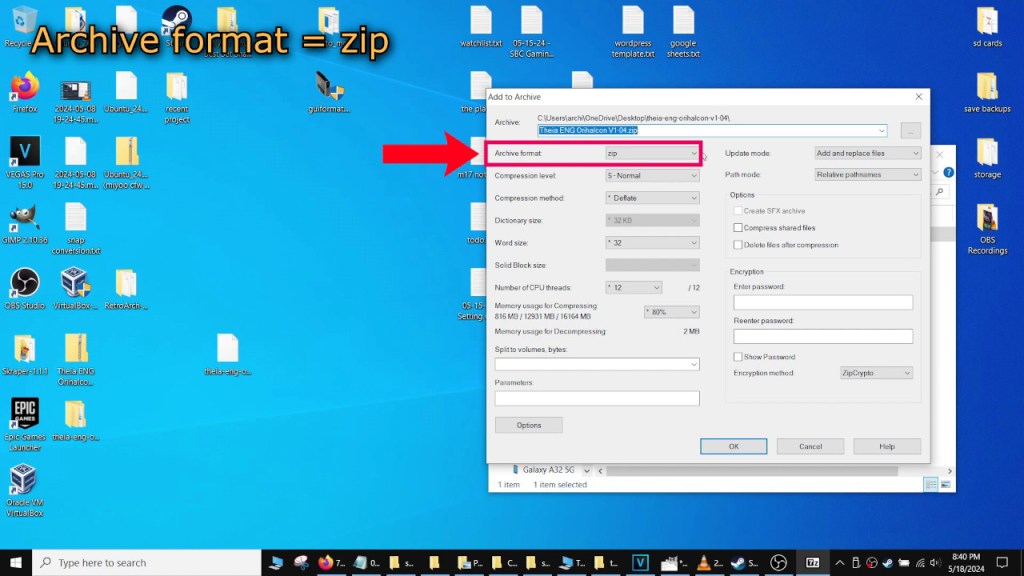
Press OK to create your zip file.
Do this step for every game you want to play that isn’t in a .zip format.
When you’re done, copy all the zip files to your microSD card. The directory for Easy RPG is SD:\Roms\EASYRPG. Once the files are done copying, you’re ready to play the games!
Some games I tried out for my guide:
►Theia – The Crimson Eclipse: https://gamejolt.com/games/theia/426665
►MOTHER: Cognitive Dissonance: http://cogdis.tazmily.com/
Using Easy RPG
Once you boot to Onion OS, go into the Games folder.
Before starting Easy RPG, press select once to bring up the option to “Refresh all roms”. Press A on this to refresh the ROMs list so we can see our newly added games.

Go to Easy RPG and start it. Pick the game you want to play, and it should launch. Just keep in mind not all games will run properly.
Troubleshooting
Here are a few things you can double check if your games are not launching. Make sure you have the RPG_RT.ini and RPG_RT.ldb files inside your zipped files. If these files are missing your game may not launch.
It’s also possible the game installation has some files corrupted. Try redownloading and rezipping the files. Make sure the archive format is set to zip for 7-Zip. Other formats may not work.
Other than that, it probably comes down to the game not working properly on the core as it is still in an experimental state for Onion OS.
Conclusion
I think the Easy RPG core is pretty neat. Not all games will run well but for the games that do, it lets you play fan made games and some are quite fantastic. It expands the library of playable games on the handheld and I’m always amazed at what these tiny handhelds can do.
Anyways that’s going to be it, thank you for dropping by and I hope this guide was useful. If you have any questions please feel free to leave a comment. As always, hope you guys are staying safe and sane out there, and catch you guys next time.

 Ducky Obrien